

You can select the date when the pre-ordered products will be delivered
-
ASAP: If you deliver product as soon as possible, orders will be marked as Unfullfilled status, like common orders.
-
Not set: If you do not know when you will deliver the product, Orders will be marked with On-hold status. You can transition them to Unfulfilled when you are ready.
-
Period: If you know the exact number of days for the delivery of the product. Orders will be marked as Scheduled and will automatically change to Unfulfilled at the scheduled date.
You can choose the shipping date in the Payment page.
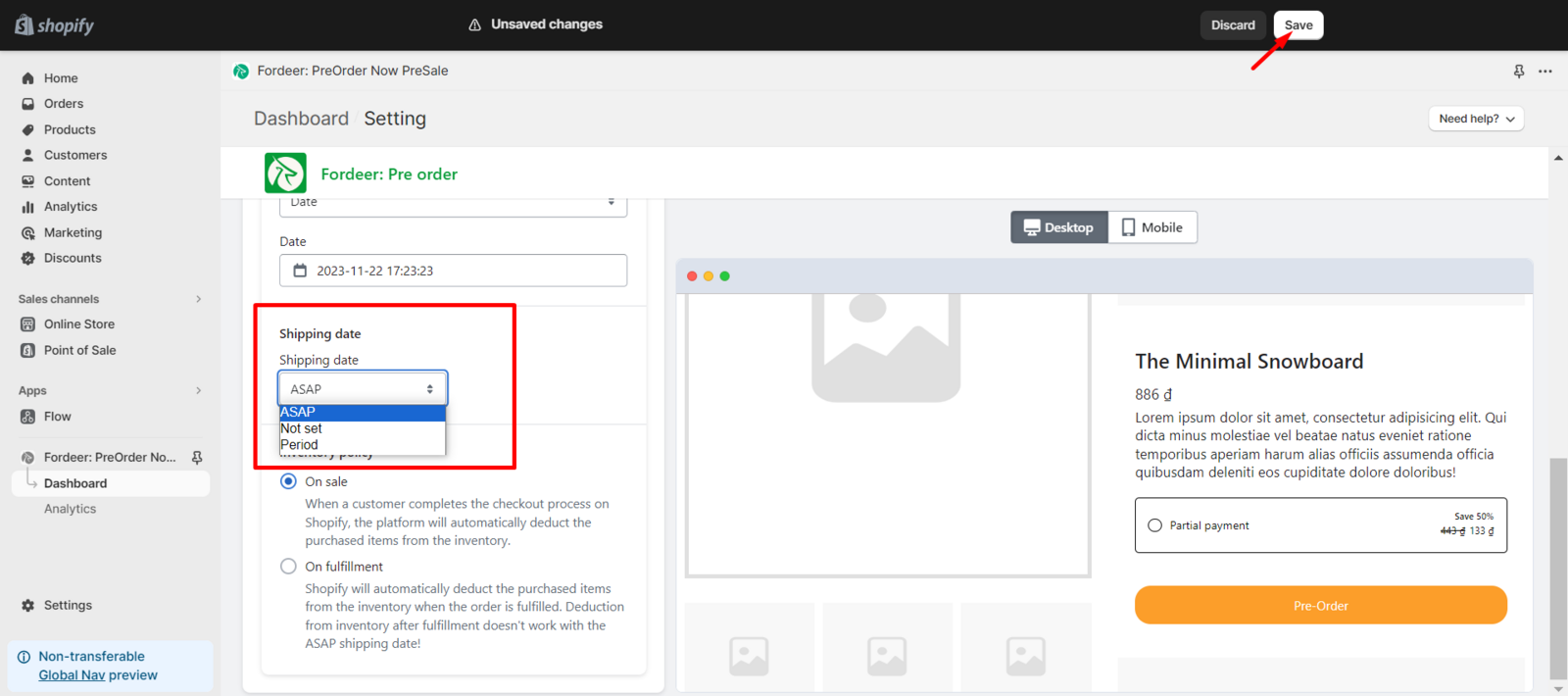
After that, kindly click Save at the end to make sure everything has been updated successfully.
We value your feedback — it helps us continuously improve ForDeer and provide you with a better experience.
👉 Chat with us: Share your feedback directly with our team.
👉 Email us: hi@fordeercommerce.io
👉 Explore more apps: Discover more Fordeer apps.
👉 Join our community: Join ForDeer Community to get the latest updates, tips, and special deals.
🕐 Working hours: 8:30 AM – 5:00 PM (UTC+7), Monday–Friday.
We typically reply to live chats within minutes and emails within a few hours.
Need help? Feel free to reach out anytime via live chat or email!